What You Will Learn
The sections below walk through the underlying concepts, the most common failure points, and a structured way to think about diagnosis — all written for learners, not technicians on the clock.
Introduction
Modern televisions are advanced electronic devices holding multiple interconnected circuit boards, precision display panels, and complex power systems. Understanding how these systems work together.
And why they fail. Needs knowledge that spans power electronics, display technology, signal processing, and software systems.
Today's flat panel TVs bear little resemblance to the cathode ray tube televisions of past generations. They are at its core different engineering solutions to the same problem: reproducing video and audio content for home viewing.
LED-backlit LCD panels and organic-LED display panels have replaced CRT tubes. But they've introduced their own failure modes that need different checking knowledge.
This overview gives a complete knowledge base for knowing television electronics. The major subsystems, their jobs, and their characteristic failure modes.
This knowledge applies broadly across different television brands and form factors, as the core engineering is consistent across the industry.
Core Concepts
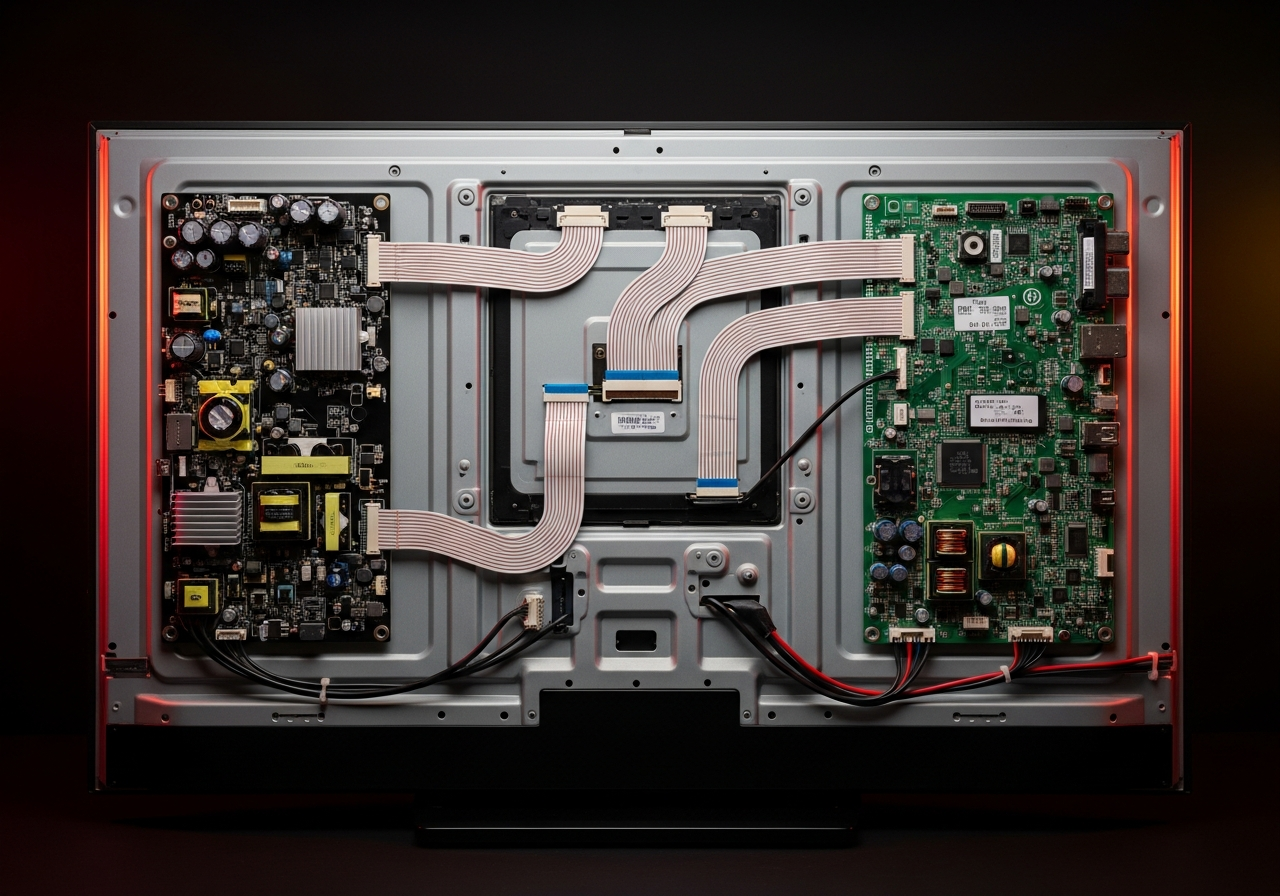
A modern flat panel television holds several distinct circuit boards, each handling a specific job. Understanding this board-level architecture is essential for knowing how TV failures manifest and which board is responsible for which symptom.
Power Supply Board
The power supply board converts household AC voltage (120V or 240V) to the multiple DC voltage rails needed by the television's other boards. Typical outputs have 24V or 48V for the LED backlight driver.
12V for the main board, 5V for the logic circuits. And 3.3V for the microcontroller and memory.
The power supply uses a switch-mode power supply (switching supply) design for speed. Failed capacitors in the power supply are one of the most common television failures.
They cause symptoms ranging from no power to backlight failure to unstable work.
Main/Logic Board
The main board handles video and audio processing, video signal routing, network connection (in smart TVs), and control jobs. It holds the main application processor (a powerful ARM-based SoC in smart TVs).
DDR memory, flash storage for the working system. And many interface chips.
Smart TV main boards are basically ARM computers running Linux-based working systems. The main board receives signals from external sources (video-cable, composite, tuner), processes them through the image processor.
And sends the processed signal to the T-Con board.
Technical Deep Dive
The display panel in an LCD TV is a passive device that cannot make light on its own. It needs a separate backlight system — an array of white LEDs arranged behind the panel — to illuminate it.
The panel itself works by blocking or passing light from the backlight using liquid crystals that change their optical properties in response to applied electric fields. Each pixel holds red, green, and blue sub-pixels that combine to make any color.
Timing Controller (T-Con) Board
The T-Con board receives the processed video signal from the main board and makes the precise timing signals needed to drive the LCD panel. It controls gate drivers (which activate rows of pixels) and source drivers (which apply the right voltage to each pixel column) in a carefully synchronized sequence at the panel's native refresh rate.
T-Con board failure usually causes horizontal or vertical lines on screen, half-image failure, or complete black screen with backlight working.
LED Backlight System
LED backlights have replaced cold-cathode (Cold Cathode Fluorescent Lamp) tubes in virtually all modern televisions. LED backlights use arrays of white LEDs arranged in rows across the back of the panel.
Local dimming TVs dynamically control individual LED zones to improve contrast. LED failures appear as bright spots, dark spots, or uneven illumination.
The backlight driver circuit on the power supply board controls the LED current. Failures in this circuit can cause the backlight to not light at all, flicker, or light unevenly.
organic-LED televisions work on fully different rules. Each organic-LED pixel makes its own light, eliminating the need for a separate backlight.
This allows true blacks (pixels fully off) and higher contrast than any LCD. But organic-LED display panels suffer from image retention (burn-in) if static elements are displayed for long periods.
organic-LED display panels are also a lot more expensive and have finite lifetime before organic materials degrade.
The most common cause of a television that displays no image but has a working backlight (visible as a faint glow visible from the side or when a flashlight is shone at the screen) is a failed T-Con board. This distinctive symptom allows confident preliminary check before any board-level testing.
Common Issues and Causes
Television failures follow likely patterns related to their electronic subsystems:
- Power board capacitor failure: Bulging or leaking capacitors on the power board are visible and cause power supply failure, no-power, or on-and-off work.
- LED backlight failure: Individual LED strips fail, causing dark bands across the screen or complete backlight failure.
- T-Con board failure: Produces horizontal or vertical lines, half-screen failure, or no image despite working backlight.
- video port damage: Physical damage from cable insertion/removal causes pin damage and connection failure.
- Smart TV software problems: Corrupted firmware in smart TVs can cause startup failures, app crashes, or inability to update.
- Remote control problems: Infrared receiver damage or battery terminal corrosion stops remote work.
Symptom-to-subsystem mapping is a powerful checking technique for televisions. Each subsystem makes a characteristic set of failure symptoms that allow confident identification of the failed board before spare.
Television power supplies and CRT televisions retain lethal high voltages even after being unplugged. The large capacitors in TV power supplies can store hundreds of volts for extended periods. Never touch internal television parts without adequate discharge precautions and proper training. This guide is for knowledge only — television servicing needs serious electrical hazards.
Diagnostic Framework
Television check uses symptom-based reasoning to spot the failed subsystem:
Step-by-Step Knowledge Framework
- Establish what works: does the TV power on, does the backlight illuminate. Is there audio without video, is there video without audio?
- Test the backlight: in a dark room, shine a flashlight at the screen while the TV is on. If you can see an image, the backlight has failed but T-Con and main board are working.
- Test video inputs: if one video port doesn't work but others do, the port has failed. If no video input works, the main board's video controller has failed.
- Check the power supply board: look for swollen capacitors, burnt parts, or soot residue showing part failure.
- Check for firmware problems: for smart TVs, try factory reset and firmware update procedures documented in the service manual.
- Isolate board by board: know which board makes which symptoms to spot the failed part without testing every board.
Television repair knowledge is specialized because the failure modes are so specific to television architecture. Board spare is the typical repair approach — part-level repair needs advanced skills and specialized tools.
Before replacing any TV board, search for the TV's service manual using its model number. Service manuals hold checking flowcharts, voltage measurement points, and part layouts that are invaluable for confirming check. Manufacturers often release service manuals publicly for older TV models.
Summary Reference Table
| Aspect | Description | Notes |
|---|---|---|
| No power at all | Power supply board | Check capacitors, fuses, transistors |
| Backlight flickers | Power board LED driver | Test LED strip continuity |
| Black screen, LED glow visible | T-Con board or LED backlight | Flashlight test confirms backlight problem |
| Horizontal lines on screen | T-Con board failure | Check T-Con board connections |
| Half screen image | T-Con gate driver failure | T-Con board spare likely needed |
| No audio, good video | Audio amplifier board | Check audio board power and connections |